Wednesday, July 1, 2020

Nuevo Libro De Daniel Fernández De Lis: De Covadonga A Tamarón


Ya puedes adquirir el segundo libro de Daniel Fernández de Lis, tras Los Plantagenet. Su título es De Covadonga a Tamarón. Historia de la monarquía asturleonesa desde Pelayo hasta Vermudo III. 
En distribución desde el día 19 de diciembre (envío por SEUR, servicio SEUR 24, entrega en general en plazo de 24 horas). Formas de pago indicadas más abajo.

Sinopsis

Cuando los dominios cristianos que surgieron después de la conquista musulmana de la Península Ibérica comenzaron a redactar crónicas que describían sus difíciles primeros años de existencia, las narraciones se realizaron en tono épico y con mayor interés en un efecto propagandístico que en la veracidad histórica. La sana costumbre de cuestionar lo que nos cuentan las fuentes históricas ha sido, en ocasiones, pervertida para acomodarla a posiciones políticas, tanto de uno como de otro signo.
Esta obra, con espíritu crítico y objetividad, trata de desentrañar las motivaciones que perseguían las primeras crónicas cristianas y de dar respuesta a las preguntas y diferentes teorías que las dudas sobre esas crónicas generan: ¿existió don Pelayo? Y de ser así, ¿quién era, un noble godo, un caudillo astur, un líder de origen gallego? ¿Hubo una batalla en Covadonga? Y si la hubo, ¿qué pasó? ¿Cómo se llamaba ese dominio cristiano del noroeste? ¿Reino de Asturias, reino de León, reino asturleonés, reino de Galicia? ¿Es correcto hablar de Reconquista para referirse a la expansión territorial cristiana que se produjo en los siglos siguientes?
Al hilo de la denominación del reino, sé que el término «monarquía asturleonesa» puede ser objeto de polémica y habrá quien no esté de acuerdo con el mismo, pero es una denominación generalmente aceptada y utilizada en tesis doctorales supervisadas por catedráticos de Historia y por eso la he empleado en el subtítulo del libro.
Además, como su título indica, De Covadonga a Tamarón narra los reinados de cada uno de los monarcas de este dominio cristiano en el noroeste peninsular, comenzando por el del enigmático don Pelayo y terminando en el de Vermudo III,  muerto en el año 1037 en la batalla de Tamarón, que supuso un punto de inflexión en las relaciones entre el reino de León y el condado de Castilla, al convertirse el conde de Castilla, Fernando Sánchez, en rey de León con el nombre de Fernando I el Magno.

Formas de adquirir el libro:

De Covadonga a Tamarón se encuentra disponible en papel y en formato de libro electrónico.
1. En papel. Además de la posibilidad de adquirirlo en las librerías que figuran más abajo, se envía a domicilio en Península y Baleares al precio de 18€ (5€ más para envíos a Canarias), incluidos gastos de envío, y se puede adquirir abonándolo de las siguientes formas:
1.1. A través de PayPal. 


Al realizar el pago asegúrate de incluir en el mensaje una dirección para el envío del libro y una dirección de correo electrónico para solventar posibles problemas. 
1.2. Para otras formas de pago (contra reembolso, transferencia bancaria) contactar por correo electrónico: contacto@curiosidadesdelahistoriablog.com
2.- Libro electrónico. Disponible en Amazon Kindle a partir del 19 de diciembre. Posibilidad más adelante de adquirirlo en papel en Amazon.
Relación de librerías donde se puede adquirir el libro físicamente a partir del 19 de diciembre.
1.- Librería La Central de Callao. Calle Postigo de San Martín nº8 (MADRID).
2.- Librería Notting Hill Bookshop. Plaza de los Santos Niños, nº5 (ALCALÁ DE HENARES).
3.- Librería Maribel. Calle Gil de Jaz nº5 (OVIEDO).
4.- Librería La Buena Letra. Calle Casimiro Velasco, 12 (GIJÓN).
5.- Librería Libros Prohibidos. Calle Bétula 5. (ÚBEDA) .
Related posts

Tuesday, June 30, 2020

12 Hacking Websites & forums - Underground hacker sites

  1. Hacked Gadgets: A resource for DIY project documentation as well as general gadget and technology news.
  2. KitPloit: Leading source of Security Tools, Hacking Tools, CyberSecurity and Network Security.
  3. NFOHump: Offers up-to-date .NFO files and reviews on the latest pirate software releases.
  4. Metasploit: Find security issues, verify vulnerability mitigations & manage security assessments with Metasploit. Get the worlds best penetration testing software now.
  5. HackRead: HackRead is a News Platform that centers on InfoSec, Cyber Crime, Privacy, Surveillance, and Hacking News with full-scale reviews on Social Media Platforms.
  6. SecTools.Org: List of 75 security tools based on a 2003 vote by hackers.
  7. The Hacker News: The Hacker News — most trusted and widely-acknowledged online cyber security news magazine with in-depth technical coverage for cybersecurity.
  8. Phrack Magazine: Digital hacking magazine.
  9. SecurityFocus: Provides security information to all members of the security community, from end users, security hobbyists and network administrators to security consultants, IT Managers, CIOs and CSOs.
  10. Hakin9: E-magazine offering in-depth looks at both attack and defense techniques and concentrates on difficult technical issues.
  11. Packet Storm: Information Security Services, News, Files, Tools, Exploits, Advisories and Whitepapers.
  12. Exploit DB: An archive of exploits and vulnerable software by Offensive Security. The site collects exploits from submissions and mailing lists and concentrates them in a single database.

Thursday, June 11, 2020

15 Important Run Commands Every Windows User Should Know

There are several ways to efficiently access the files, folders, and programs in Windows operating system. We can create shortcuts, pin programs to the taskbar, Start menu shortcuts etc. but we can't do it for all programs in many cases. However, the Windows Run Command box is one of the most efficient ways of accessing system programs, folders, and settings.

In this article, I am going to share 15 most important Run commands for Windows users. These commands can make it easier to manage a lot of tasks.
How to open Windows Run command box?
You need to press Win+R (Hold Windows button then Press R)

Important Run Commands Every Windows User Should Know

1. %temp%
This is the fastest way to clear the temporary files from your computer. It can save a lot of space which was being wasted by temporary files.
2. cmd 
This command will open the windows DOS command prompt. Windows command prompt is very useful for performing many tasks which are not possible using graphical user interface.
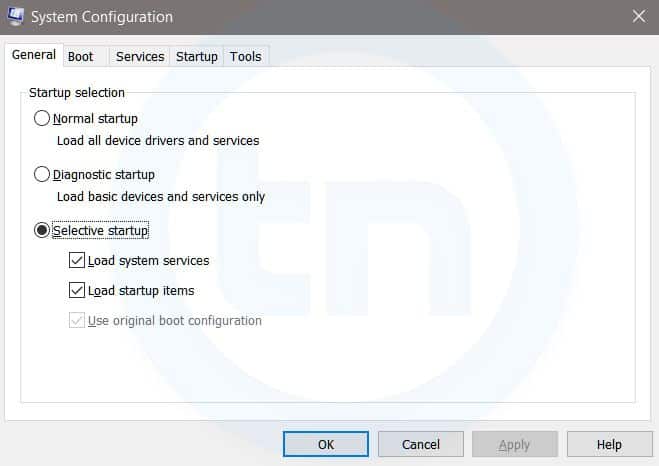
3. MSConfig
Windows Run Command - MSconfig-compressed
Windows System Configuration
This command will open Windows System Configuration where you can edit different things like the boot options, startup options, services, etc.
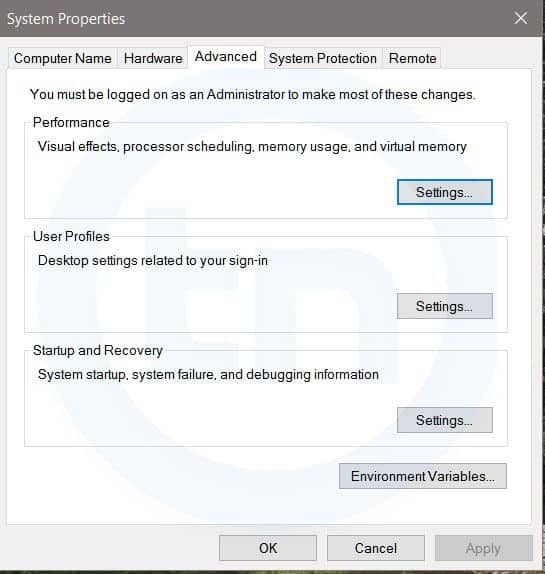
4. sysdm.cpl
Windows Run Command - sysdm cpl-compressed
System Properties window
This command will open the System Properties window, Where you can change the system protection and performance related many settings
5. Powershell
Powershell is very similar the command prompt. Just type this command in the Run dialog box, and you will have your PowerShell opened without administrator privileges.
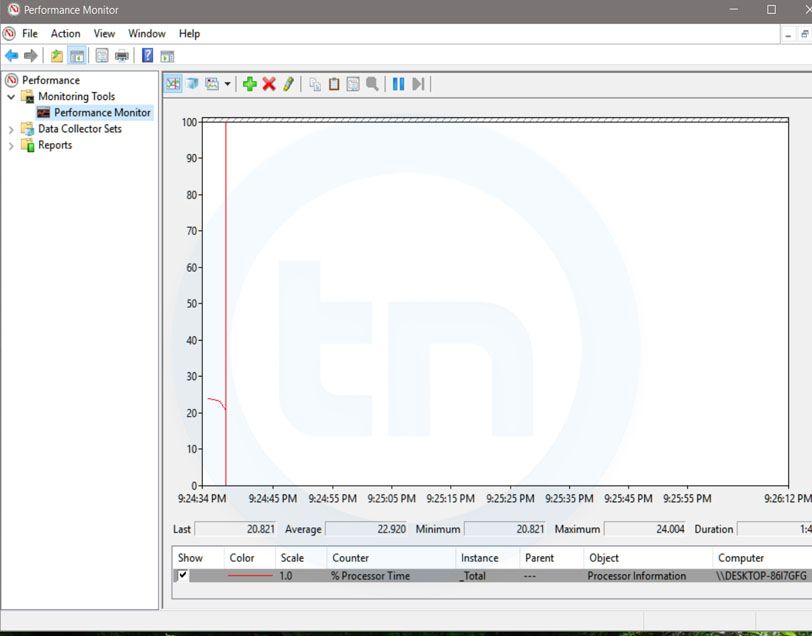
6. perfmon.msc
Windows Run Command - perfmon msc-compressed
Windows System Performance monitor
This command can be used to monitor the performance of your computer. There are plenty of options for monitoring the system performance
7. regedit
Regedit Run command is used to open the Windows Registry. It is a hierarchical database that hosts all the configurations and settings of Windows operating system, it's users and the installed software.
8. \ (Backslash)
This is one of the lesser known Run commands. Just enter the backslash into the Run dialog box and it will open up the C drive. It is one of the quickest ways to access the C drive.
9. . (Dot)
This is yet another lesser known Run command. When executed, it opens the current user's home folder which hosts all the other local folders like the Downloads, Documents, Desktop, Pictures, etc.
10. .. (Double Dots)
When you execute these two dots in the Run dialog box, it will open up the Users folder which is located directly on the C drive
11. Control
This command will open the control panel. Control panel is used for managing all the system settings and programs
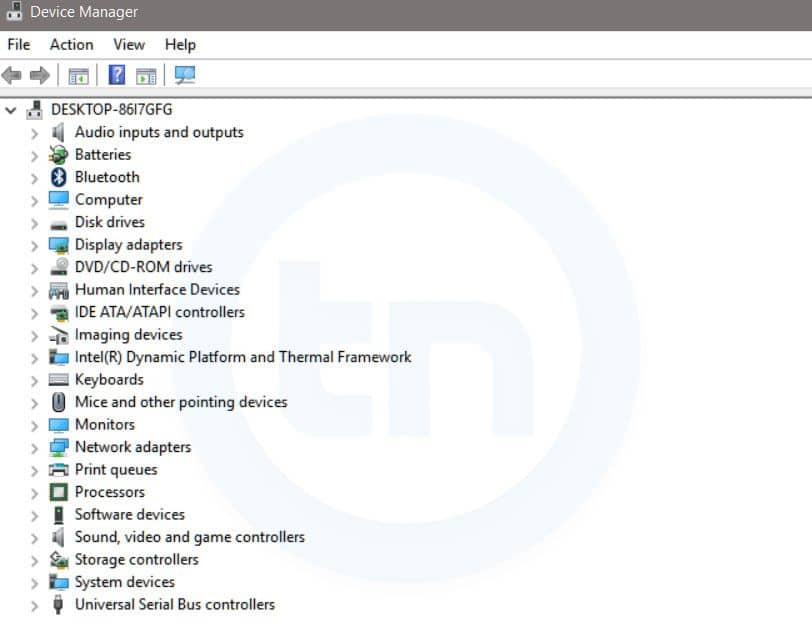
12. hdwwiz.cpl
Windows Run Command - hdwwiz-
Windows Device Manager
This command is used to open the Device Manager in Windows. You can manage all the device connected internally or externally to your PC.
13. Notepad
The quickest way to open notepad in Windows. Just type this command in Run Box and hit enter.
14. osk
This command will open On-Screen Keyboard on your display monitor. You can easily touch and type or use your mouse for typing.
15. taskmgr 
This command will open task manager where you can manage all the processes and programs running on Windows Operating system.
More information

Top 20 Best Free Hacking Apps For Android |2019|

 20 Best Free hacking apps For Android |2019|. 

Android is now one of the most popular operating systems. So, hackers have also started using Android devices for their tasks. Now Android devices are used for penetration testing and other hacking activities including IT security administrator, Wi-Fi hacking and network monitoring. There are several hacking apps or Android devices. So, we have curated a list of best hacking apps for Android.


Before you start using these apps, you must take a backup of your important data. I also recommend the use of these apps on a separate device. Using this on your primary phone is not recommended. It is because many of these apps require a rooted device and app can also harm your phone.


Note: Hacking apps can be used for educational and malicious purpose. But we never encourage malicious operations. We are listing the apps here just for educational purpose. You should only use these apps to learn. We do not support any unethical use of these apps.

1.  AndroRAT

AndroRAT stands for Android RAT. RAT is the short form of Remote Administrative Tool and it allows an attacker to remotely control and fetch information from a device. AndroRAT does the same thing. It has a server developed in Java/Swing but the Android application has been developed in Java Android.

AndroRAT allows you to connect information like call logs, contacts, messages, location and more. You can remotely monitor sent and received messages send texts, use the camera, open a URL in the browser, make phone calls and remotely monitor the device.

The connection to the server can be triggered by an SMS or a call. From the server GUI, you can check all the connected clients and access information.

As the app allows silent remote access, it is not available on Play Store.

                Download APK

2. zANTI

zANTI is a known penetration testing suite of applications you can install locally on Android smartphone. This tool brings scanning tools Diagnostic features and Reporting tools. You can use this malicious software to attack a network and check for any loopholes in your network. This tool is used to test redirect and SSL stripping attacks. You can edit request and response messages from web servers, the host takes websites from your Android phone and more.


                  Download 

3. FaceNiff

FaceNiff is another good Android hacking that allows you to intercept the traffic of your WiFi network. You can use this tool to snoop what people are doing on the network you are. You can snoop on services like Facebook, Twitter, Amazon, YouTube and more. This is one of the notable too for steal cookies from the WiFi network and gives the attacker unauthorized access to other people's account.

This app requires a rooted device. So, you can only use the app if you have a rooted phone.

Download APK

4. Droidsheep

Droidsheep is also a similar app that helps security analysts understand what is happening in your Wi-Fi network. Like Face Sniff, this app can also hijack the web session profiles over a network and supports most of the services and websites.

The primary difference between Droidsheep and FaceSniff is that Droidsheep works with almost all the websites while FaceSniff has limited support.

                     Download APK

5. Hackode

Hackode is another good hacking apps for Android. It is not a single app but a collection of tools for ethical hackers and penetration testers. The app comes with three modules including Reconnaissance, Scanning and Security Feed. You can use this app for SQL Injection, Google hacking, MySQL Server, Whois, Scanning, DNS Dif, DNS lookup, IP, MX Records, Security RSS Feed, Exploits etc.

The app is still in beta, but available in Play Store.

                  Download Here

6. cSploit

cSploit is also a good security tool for Android. It comes with several options like cracking Wi-Fi password, installing backdoors, finding vulnerabilities and their exploits. If you are looking for a good hacking app or hacker app for Android, you should try this one for sure.

                  Download APK

7. DroidBox

DroidBox is also a similar kind of app that allows you to do the dynamic analysis of Android applications. You can use this app to get information like hashes of APK package, network traffic, SMS & phone calls, Incoming/outgoing network data, Listing broadcast receivers and more.

                    Download

8. Nmap

If you are into security or hacking, I am sure you already know the name of this too. Like the desktop tool, Nmap for Android also allows you to scan

It works on both on non-rooted and rooted phones. If you are a beginner, you should try this app and learn from it.

                      Download

9. SSHDroid

SSHDroid is SSH tool developed for Android. It lets you connect to a remote computer and run terminal commands, transfer and edit files. The app also provided features like shared-key authentication, WiFi autostart whitelist, extended notification control etc,

This app is available on Play Store.

                    Download

10. Kali Linux NetHunter

Kali Linux NetHunter is an open source penetration testing platform for Android. It officially supports Nexus and OnePlus devices. It provides the ultimate penetration testing platform that allows you to perform a wide range of attacks.

                     Download

11. APKInspector

APKInspector allows you to perform reverse engineering on an APK. you can use this to get a deep insight or APK and get the source code of any Android app. You can do modifications in the APK and visualize the DEX code to erase the credits and license.

                 Download APK

12. Shark for Root

Shark for Root is an advanced hacking tool for security experts and hackers. It can work as a traffic snipper. You can use the tcpdump command on rooted devices. It works on Wi-Fi, 3G, and FroYo tethered mode.

                    Download

13. dSploit

dSploit is an Android network penetrating testing suit. You can download and install it on your device to perform network security testing. It supports all Android devices running on Android 2.3 Gingerbread or higher. You need to root this phone for using the app. After rooting the phone, you need to download BusyBox from Google Play Store

The app comes with several modules including Port Scanner, Inspector, RouterPWN, Trace, Login Cracker, Packet Forger, Vulnerability Finder, and MITM.

                      Download

14. WPScan

WPScan is a WordPress vulnerability scanner for Android. This app is used to scan WordPress based websites and find possible vulnerabilities. WPScan is a popular desktop tool but this WPScan for Android is not related to that. So, do not think of it as an official WPScan app.

                      Download

15. Network Mapper

Network Mapper is a network scanner tool for network admins. It used to scan the network, lists all devices connected and find Open ports of various servers like FTP servers, SSH servers, SMB servers etc on the network. The tool is available on Play Store.

                     Download

16. Andosid

Andosid is like LOIC for the desktop. This tool is used to perform DOS attacks from Android mobile phones. You can use this tool to set a target URL and perform a DOS attack in one click. The tool will start flooding target URL with fake requests.

                     Download

17. DroidSQLi

DroidSQLi app allows attackers to perform SQL Injection on a target URL. You just need to find a target URL and this tool will start the fully automated SQL Injection attack.

                     Download

18. AppUse

AppUse is a Virtual Machine developed by AppSec Labs. It is a freely available mobile application security testing platform that comes with lots of custom made tools by AppSec Labs. If you want to sue your Android phone as your penetration testing tool, this one is for you.

                   Download

19. Network Spoofer

Network Spoofer is also a good hacking app for android. It lets you change the website on other people's computer from your Android phone. Connect to a WiFI network and then choose a spoof to use with the app. this tool is to demonstrate how vulnerable a network is. Do not try this on any unauthorized networks.

                 Download

20. DroidSheep Guard

As the name suggests, DroidSheep Guard works against DroidSheep. It monitors Android devices' ARP-table and tries to detect ARP-Spoofing attack on your network. It does not require a rooted device.

               Download


@EVERYTHING NT


More info
  1. Pentest Magazine
  2. Pentest Report
  3. Pentest Vs Red Team
  4. Hacking The Art Of Exploitation
  5. Pentest Os
  6. Hacking For Dummies
  7. Pentest Network
  8. Pentest Jobs

Amnesia / Radiation Linux Botnet Targeting Remote Code Execution In CCTV DVR Samples


Reference

Amnesia / Radiation botnet samples targeting Remote Code Execution in CCTV DVR 


Download

             Other malware


Hashes


MD5SHA256SHA1
74bf554c4bc30d172cf1d73ac553d76606d30ba7c96dcaa87ac584c59748708205e813a4dffa7568c1befa52ae5f03743c40221177383da576b11a0b3f6b35d68a9cde74
5dd9056e5ab6a92e61822b6c04afd34610aa7b3863f34d340f960b89e64319186b6ffb5d2f86bf0da3f05e7dbc5d9653c865dd67853a24fd86ef74b05140827c1d5fd0bd
2b486466f4d3e30f7b22d0bc76cb68f9175fe89bbc8e44d45f4d86e0d96288e1e868524efa260ff07cb63194d04ea575ed62f6d1588bea33c20ababb42c02662d93d6015
3411bb2965f4c3d52c650aff04f48e521d8bc81acbba0fc56605f60f5a47743491d48dab43b97a40d4a7f6c21caca12a1e0281178b4a9d8dec74f50a7850867c87837435
34f915ac414e9aad2859217169f9a3aa2f9cd1d07c535aae41d5eed1f8851855b95b5b38fb6fe139b5f1ce43ed22df22d66f1e47c983a8d30ad7fd30cd08db8cd29a92b0
59e08f2ce1c3e55e2493baf36c1ad3c6327f24121d25ca818cf8414c1cc704c3004ae63a65a9128e283d64be03cdd42e90d45b81e9a97ddcc9911122f4e8fd439ccc8fa9
f4bc173bf80d922da4e755896af0db6137b2b33a8e344efcaca0abe56c6163ae64026ccef65278b232a9170ada1972affab32f8c3ce3a837e80a1d98ada41a5bf39b01e7
a253273e922ce93e2746a9791798e3fe3a595e7cc8e32071781e36bbbb680d8578ea307404ec07e3a78a030574da8f9699cfdec405f6a9f43d58b1856fce7ca3445395d3
335e322c56278e258e4d7b5e17ad98e64313af898c5e15a68616f8c40e8c7408f39e0996a9e4cc3e22e27e7aeb2f8d54504022707609a0fec9cbb21005cb0875be2a4726
93522e5f361a051f568bd1d74d901d3046ea20e3cf34d1d4cdfd797632c47396d9bdc568a75d550d208b91caa7d43a9be7fc96b2a92888572de2539f227c9a6625449f83
c86af536d87c1e5745e7d8c9f44fd25d4b0feb1dd459ade96297b361c69690ff69e97ca6ee5710c3dc6a030261ba69e06ef69a683913ae650634aedc40af8d595c45cb4f
90c7c5e257c95047dbf52bbfbe011fd64db9924decd3e578a6b7ed7476e499f8ed792202499b360204d6f5b807f881b81c3a9be6ae9300aaad00fb87d5407ed6e84ec80b
7c0528e54b086e5455ef92218ea23d035e6896b39c57d9609dc1285929b746b06e070886809692a4ac37f9e1b53b250c868abc912ff2fdcd733ff1da87e48e7d4c288a73
6405b42d2c7e42244ac73695bb7bfe6b64f03fff3ed6206337332a05ab9a84282f85a105432a3792e20711b920124707173aca65181c8da84e062c803a43a404ad49302d
6441157813de77d9849da5db9987d0bb6b2885a4f8c9d84e5dc49830abf7b1edbf1b458d8b9d2bafb680370106f93bc392dff9bdb31d3b9480d9e5f72a307715859dd094
614ea66b907314398cc14b3d2fdebe796b29b65c3886b6734df788cfc6628fbee4ce8921e3c0e8fc017e4dea2da0fd0bc7e71c42d391f9c69375505dbf3767ba967f9103
00fe3120a666a85b84500ded1af8fb61885dce73237c4d7b4d481460baffbd5694ab671197e8c285d53b551f893d6c09342ed67e08d16ab982a4012fcecdca060a5da46b
5477de039f7838dea20d3be1ae249fcb886136558ec806da5e70369ee22631bfb7fa06c27d16c987b6f6680423bc84b05b19202b45e5a58cadec8c2efa40fd924b64177d
91bf10249c5d98ea6ae11f17b6ef09708f57ec9dfba8cf181a723a6ac2f5a7f50b4550dd33a34637cf0f302c43fd0243682dab9ec3ff0b629cce4e16c9c74171dd2551d4
fb0a7e12d2861e8512a38a6cdef3ddf09351ee0364bdbb5b2ff7825699e1b1ee319b600ea0726fd9bb56d0bd6c6670cbc077c490bb22df9886475dc5bedfc6c032061024
9b7f5a1228fa66cbd35e75fb774fdc8e9c7a5239601a361b67b1aa3f19b462fd894402846f635550a1d63bee75eab0a2ae89bc6c5cc1818b3136a40961462327c3dececc
5b97d54dc5001eb7cf238292405070a6a010bf82e2c32cba896e04ec8dbff58e32eee9391f6986ab22c612165dad36a096d2194f5f3927de75605f6ca6110fe683383a01
642f523bb46c2e901416047dca1c5d4ead65c9937a376d9a53168e197d142eb27f04409432c387920c2ecfd7a0b941c8bbf667213a446bc9bc4a5a2e54e7391752e3a9b8
c617655312c573ecb01d292b320fff2eaeb480cf01696b7563580b77605558f9474c34d323b05e5e47bf43ff16b67d6ade102a6f35e08f18aa0c58358f5b22871eb0a45f
c8835a3d385162ae02bd4cb6c5ebac87b113ec41cc2fd9be9ac712410b9fd3854d7d5ad2dcaac33af2701102382d5815831eb9cf0dcd57a879c04830e54a3b85fe5d6229
1497740fa8920e4af6aa981a5b405937b13014435108b34bb7cbcef75c4ef00429b440a2adf22976c31a1645af5312528d6b90f0b88b1ad5dcc87d377e6a82dc6ac64211
5e925e315ff7a69c2f2cf1556423d5afb3d0d0e2144bd1ddd27843ef65a2fce382f6d590a8fee286fda49f807471154564fe900b3a2b030c28211404afa45703c6869dea
951ec487fb3fece58234677d7fe3e4dcbdefa773e3f09cdc409f03a09a3982f917a0cc656b306f0ece3dd1a2564a87720b03d9471522590530dd90ad30b2d235ec98b578
3e84998197fc25cbac57870e3cdeb2dec03b403d5de9778a2ec5949d869281f13976c2fc5b071e0f5f54277680c809020b9eb6d931dc6b226a913e89bb422f58228de0d0
c3a73d24df62057e299b6af183889e6bcb2382b818993ef6b8c738618cc74a39ecab243302e13fdddb02943d5ba794836a683ef6f7653e5ee64969cbbbe4403601ae9ded
d428f50a0f8cd57b0d8fe818ace6af20ce61dcfc3419ddef25e61b6d30da643a1213aa725d579221f7c2edef40ca2db39bd832256b94e43546dfb77532f6d70fcd1ce874
e1d6d4564b35bb19d2b85ca620d7b8f2d0bda184dfa31018fe999dfd9e1f99ca0ef502296c2cccf454dde30e5d3a9df9c1af00d3263893b5d23dbf38015fe3c6a92cefaf
e9502ae7b0048b9ea25dd7537818904ce7d6b3e1fba8cdf2f490031e8eb24cd515a30808cdd4aa15c2a41aa0016f80820e080ac0130ab3f7265df01b8397e4abd13c38cb
8eb34e1fb7dd9d9f0e1fef2803812759eb54dc959b3cc03fbd285cef9300c3cd2b7fe86b4adeb5ca7b098f90abb55b8a5310a99f0f8c92bfa2f8da87e60c645f2cae305a
ca0fc25ce066498031dc4ca3f72de4b8f23fecbb7386a2aa096819d857a48b853095a86c011d454da1fb8e862f2b45837f4d97eea294fc567b058b09cc915be56c2a80e1
5a2fcfff8d6aab9a0abe9ca97f6093edf6af2fa4f987df773d37d9bb44841a720817ce3817dbf1e983650b5af9295a16f4ddf49fbf23edb23f50be62637a4a688e352057
ed98e8fa385b39ca274e0de17b1007e6f7a737cb73802d54f7758afe4f9d0a7d2ea7fda4240904c0a79abae732605729a69d4c2b88bfe3a06245f8fbfb8abe5e9a894cec
320db5f1230fcfe0672c8515eb9ddcfcf7cf1e0d7756d1874630d0d697c3b0f3df0632500cff1845b6308b11059deb078d40dbf34a02dd43a81e5cdc58a0b11bfa9f5663
18d6af9211d0477f9251cf9524f898f3f97848514b63e9d655a5d554e62f9e102eb477c5767638eeec9efd5c6ad443d8b0e76be186fd609d5a8a33d59d16ffa3bdab1573

More articles


Wednesday, June 10, 2020

SMBleed: A New Critical Vulnerability Affects Windows SMB Protocol

Cybersecurity researchers today uncover a new critical vulnerability affecting the Server Message Block (SMB) protocol that could allow attackers to leak kernel memory remotely, and when combined with a previously disclosed "wormable" bug, the flaw can be exploited to achieve remote code execution attacks. Dubbed "SMBleed" (CVE-2020-1206) by cybersecurity firm ZecOps, the flaw resides in

via The Hacker News

Related articles


  1. Pentest Ubuntu
  2. Hacking Box
  3. Hacking Bluetooth
  4. Pentest Vs Ethical Hacking
  5. Pentestbox
  6. Pentest Cheat Sheet
  7. Pentester Academy
  8. Hacking With Python
  9. Pentest Reporting Tool
  10. Pentest Questions
  11. Hacker Attack
  12. Hacking Process
  13. Pentest Lab Setup
  14. Hacking Youtube
  15. Pentest Software
  16. Pentest Magazine
  17. Pentest Smtp
  18. Pentest Open Source
  19. Hackerrank Sql